The story
A data centre in Geneva runs electric chillers on its roof. They keep the servers cool, but the heat they remove goes straight into the air, and running them costs money.
Close by, the city's district heating network is about to expand. From the operator's point of view there are three questions: is it worth selling the waste heat to the network? Should the roof get solar panels? And is a battery worth adding?
The site needs about 1,000 MWh of electricity and 1,000 MWh of cooling a year. The roof has 2,000 m² for solar, in east–west pairs tilted at 15 degrees. You'll give Sympheny the demands, the prices and the candidate technologies, and it works out the lowest-cost combination over 20 years.
Step by step
Follow along in Sympheny. Each step has a screenshot from the video; click the time under it to watch that moment.
- 1
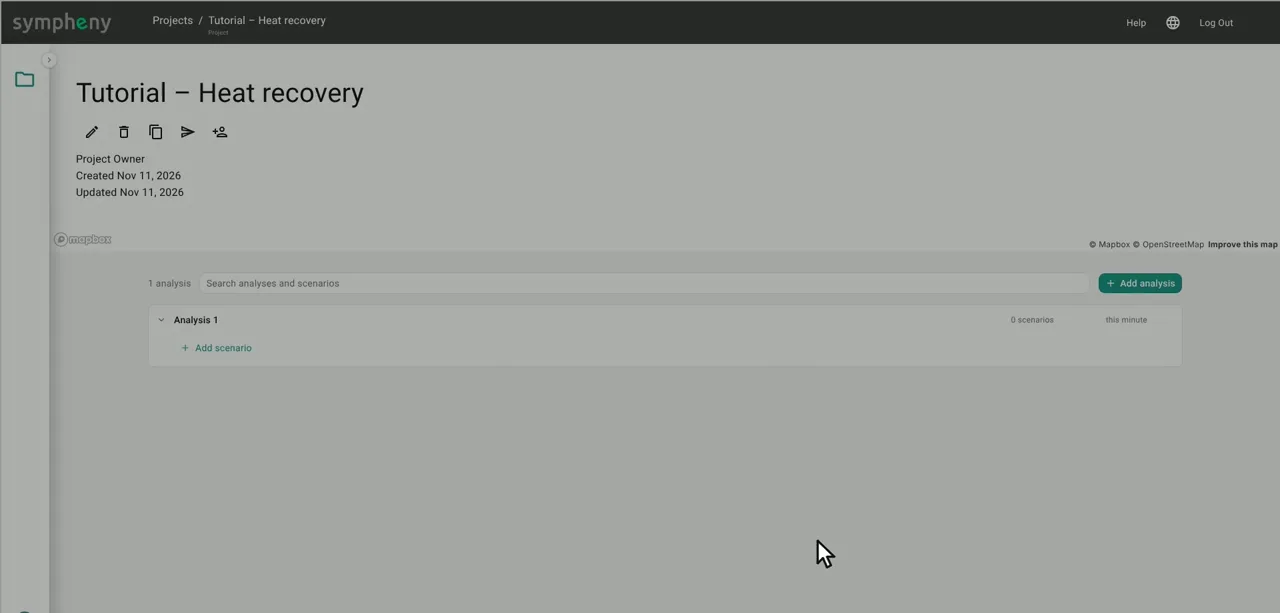
Create the project and a scenario
On the Projects page, click the plus button, name the project (here “Tutorial – Heat recovery”) and find the site on the map. Then add a first scenario in Analysis 1. The scenario opens on the nine-step setup that runs along the top of the screen.
In the documentation: Projects ↗
- 2
Step 1, General
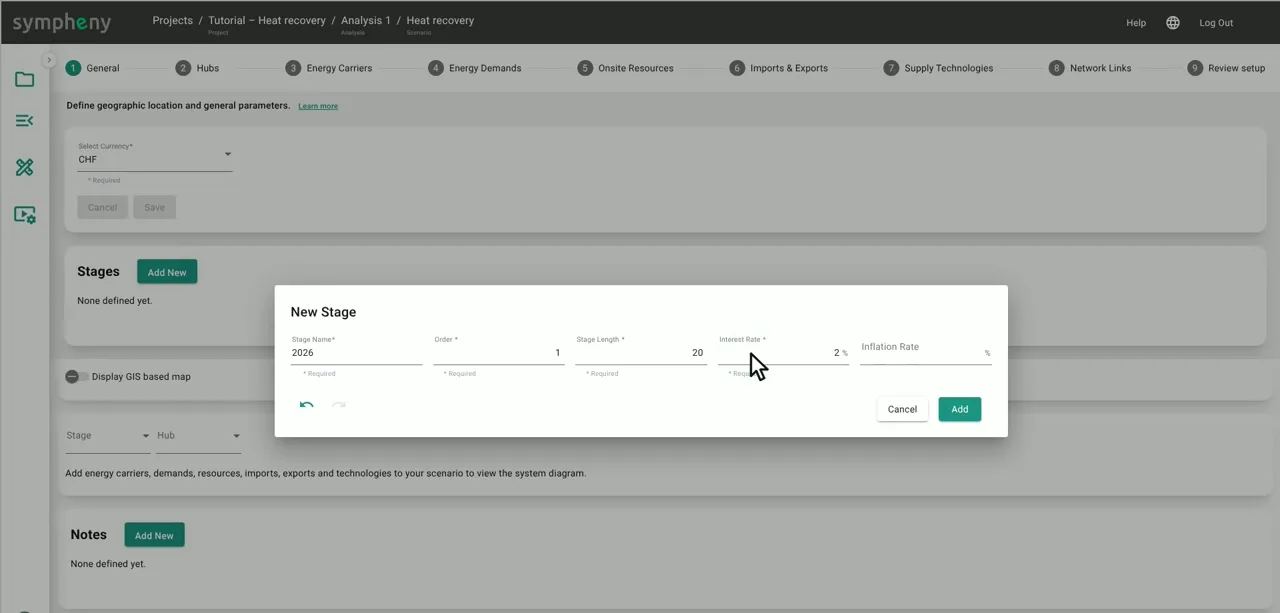
Set the currency to Swiss francs (CHF).
Under Stages, click Add New and create one stage: 2026, 20 years long, with an interest rate of 2 %.
In the documentation: General step ↗
- 3
Step 2, Hubs
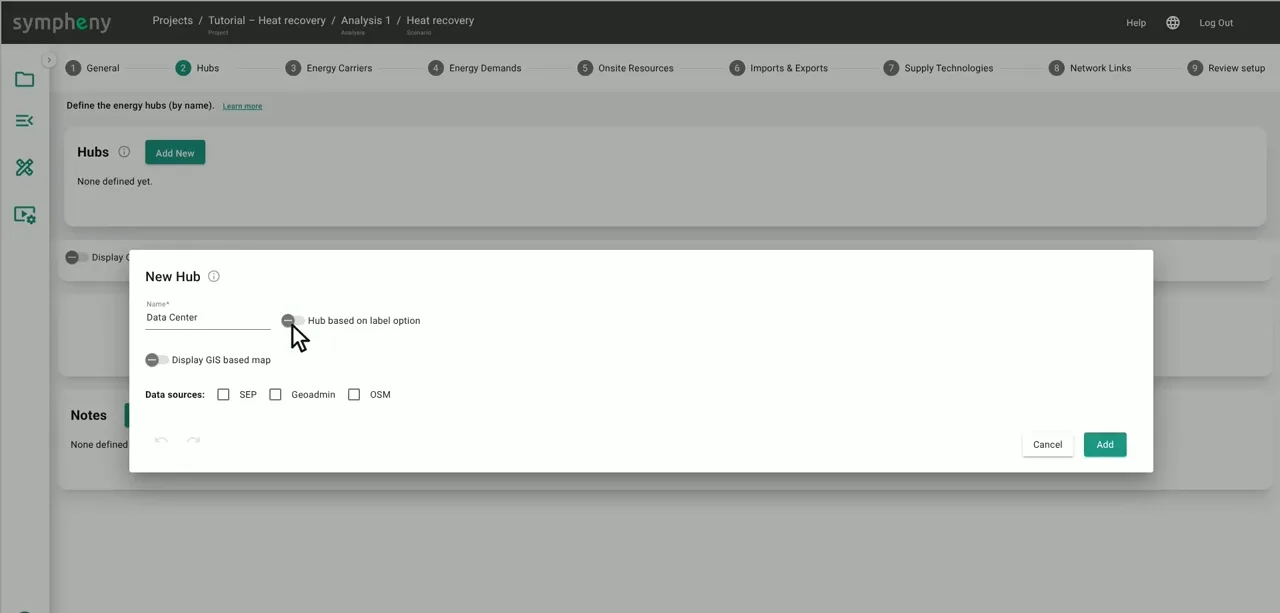
Click Add New and add one hub: Data Center. A hub is a site where energy is converted, stored and used; this whole example sits in one.
In the documentation: Hubs step ↗
- 4
Step 3, Energy Carriers
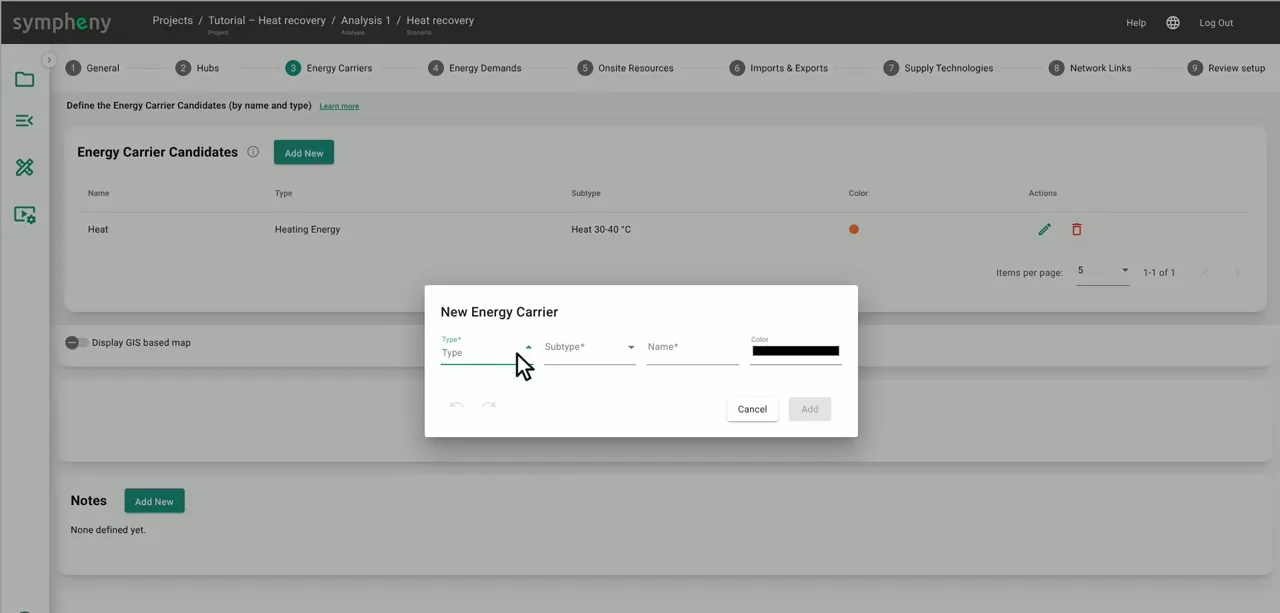
This system needs five carriers. For each one, pick the type and subtype and give it a name:
• Heat (Heating Energy, Heat 30–40 °C) – the heat sold to the district heating network
• Heat Ambient (Heating Energy, Heat Ambient) – the low-temperature heat that comes off the chillers
• Cooling (Cooling Energy)
• Electricity (Electrical Energy)
• Solar Roof (On-site Resource) – the sunlight on the roof
In the documentation: Energy carriers step ↗
- 5
Step 4, Energy Demands
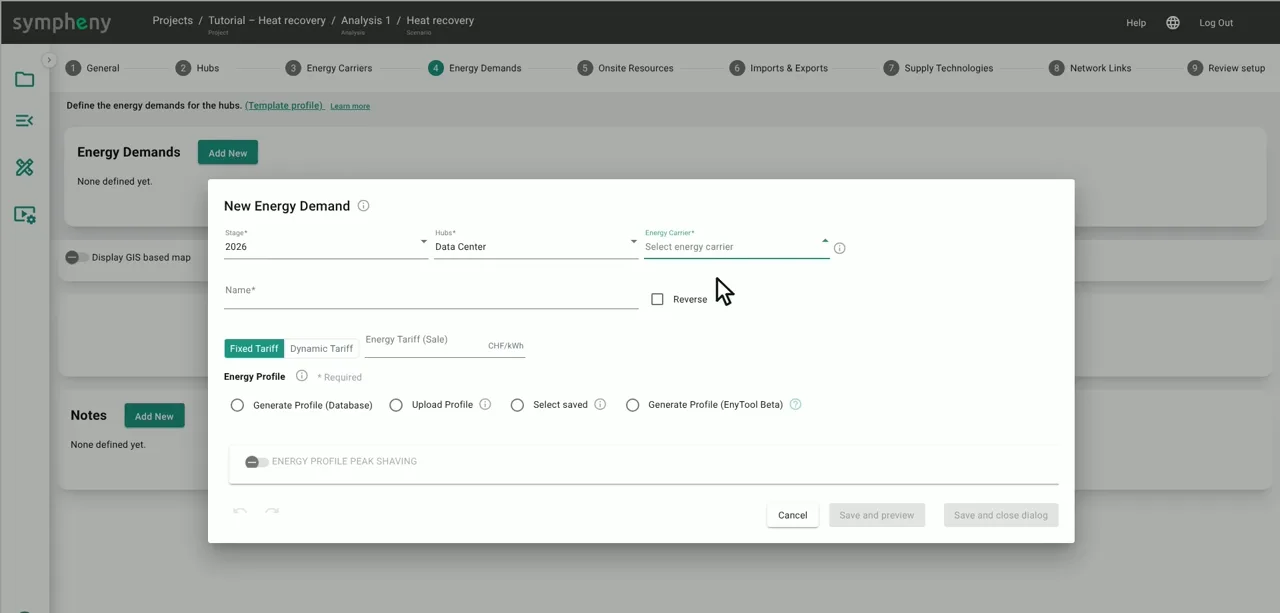
Add the electricity demand: choose the Electricity carrier, give it a name and upload an hourly profile. For this example we prepared one with 8,760 hourly values. In your own project, upload metered data or generate a profile from Sympheny's database.
Add the cooling demand the same way. The chart icon next to a demand shows its profile: cooling stays between about 70 and 200 kW all year.
In the documentation: Energy demands step ↗
- 6
Step 5, Onsite Resources
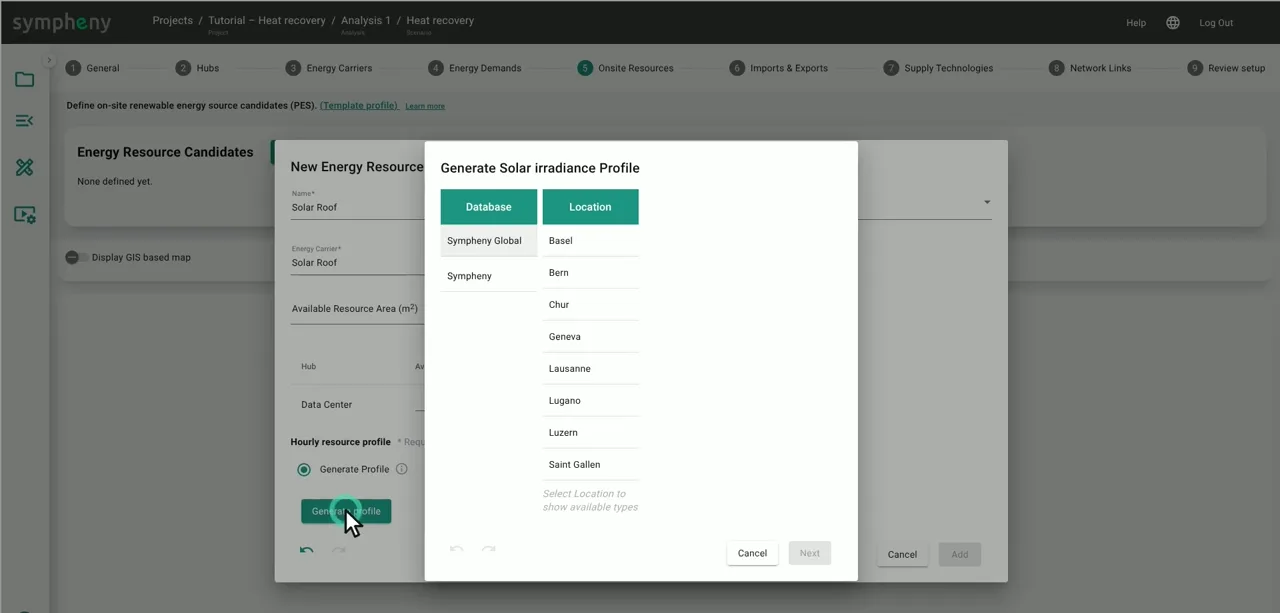
The roof has 2,000 m² for solar, in east–west pairs tilted at 15 degrees. Add it as two resources on the Solar Roof carrier, West-wing and East-wing, with 1,000 m² each.
For each one, click Generate profile and pick Geneva, roof, 15 degrees, facing west (and east for the second wing).
In the documentation: On-site resources step ↗
- 7
Step 6, Imports & Exports: grid electricity
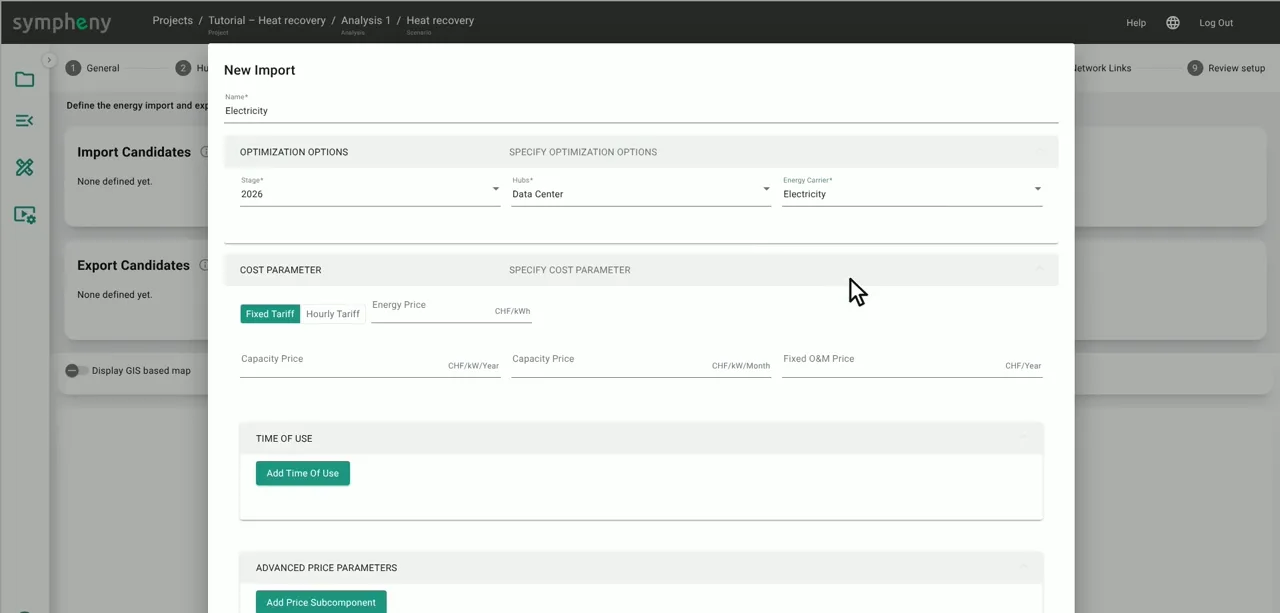
Add grid electricity as an import: 0.20 CHF/kWh, a monthly capacity price of 2.40 CHF/kW, a fixed price of 250 CHF a year, and emissions of 0.1 kg CO₂ per kWh.
In the documentation: Imports & exports step ↗
- 8
Step 6, Imports & Exports: three exports
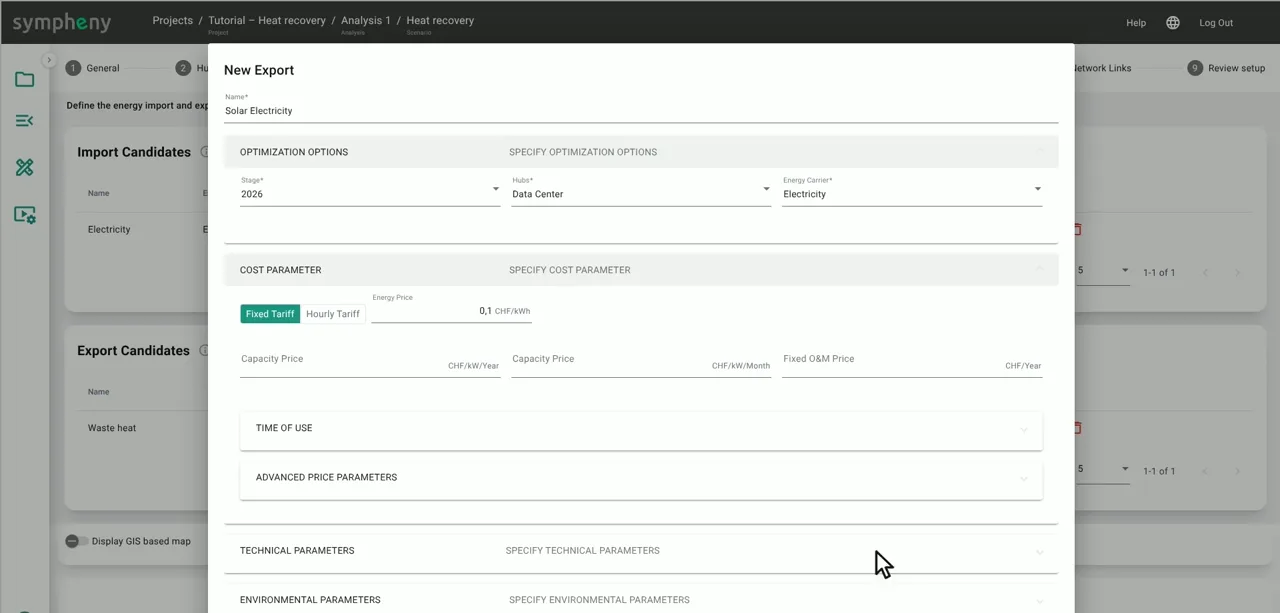
Prices on exports count as income, so a cost is entered as a negative price.
Waste heat: the Heat Ambient carrier dumped through the air chillers. Getting rid of it costs money, so its prices are negative (−0.02 CHF/kWh and −1 CHF/kW a year).
Solar Electricity: surplus solar sells at 0.10 CHF/kWh.
District Heat: heat sells to the district heating network at 0.08 CHF/kWh, with a capacity price of 22 CHF/kW a year that stands for the piping.
In the documentation: Imports & exports step ↗
- 9
Step 7, Supply Technologies: solar
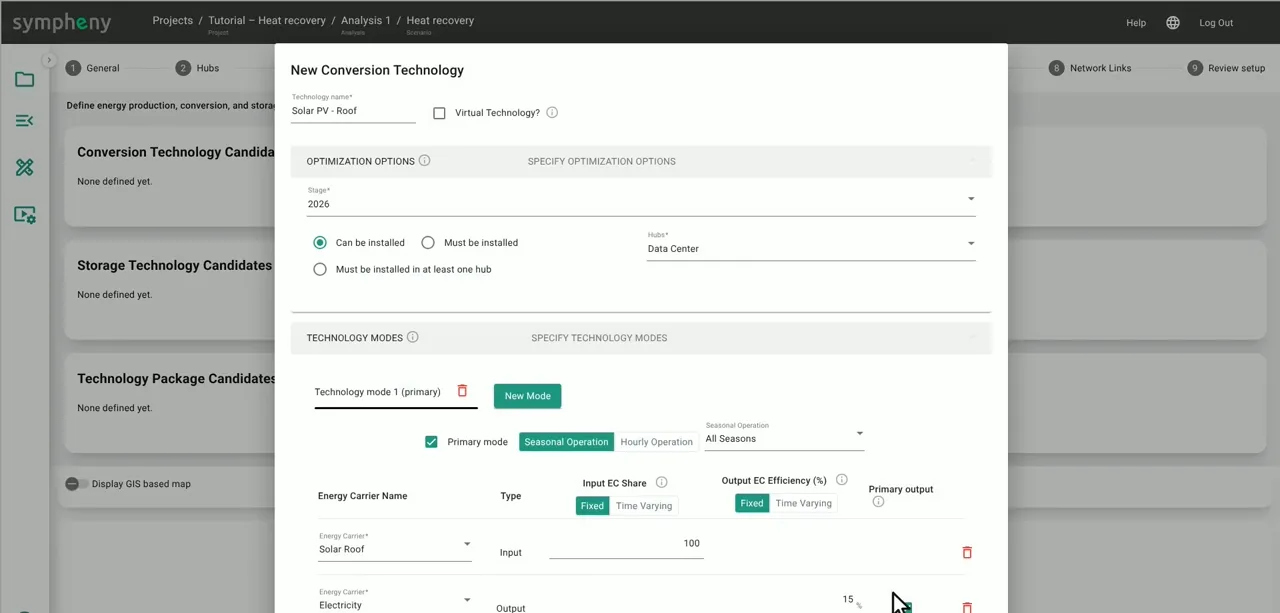
Click Add from Database and pick solar panels for roofs (“Solar PV - Roof”). We adjusted the efficiency (18 %), lifetime (30 years) and costs. Leave the capacity on Optimize: Sympheny decides the size.
In the documentation: Supply technologies step ↗
- 10
Step 7, Supply Technologies: heat pump
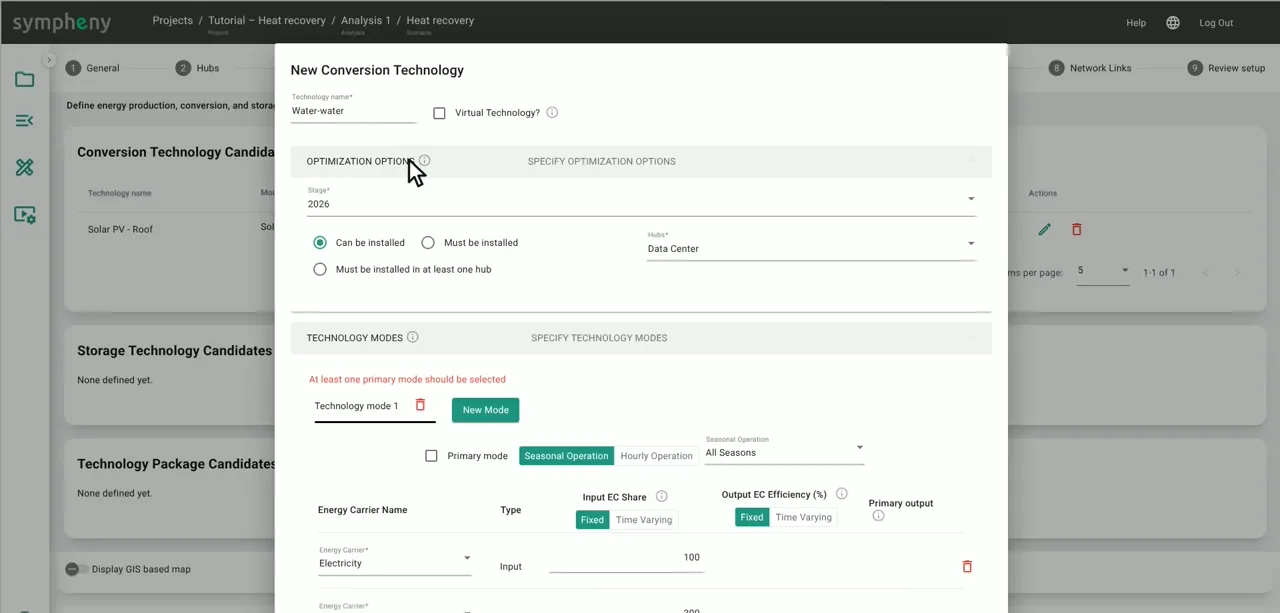
Next, the heat pump that recovers the waste heat: a water-to-water heat pump from the database. Its inputs are electricity and ambient heat in a ratio of one to three, so one unit of electricity plus three units of waste heat give four units of heat – a COP of 4.
Tick Primary mode, and add it.
In the documentation: Supply technologies step ↗
- 11
Step 7, Supply Technologies: electric chiller
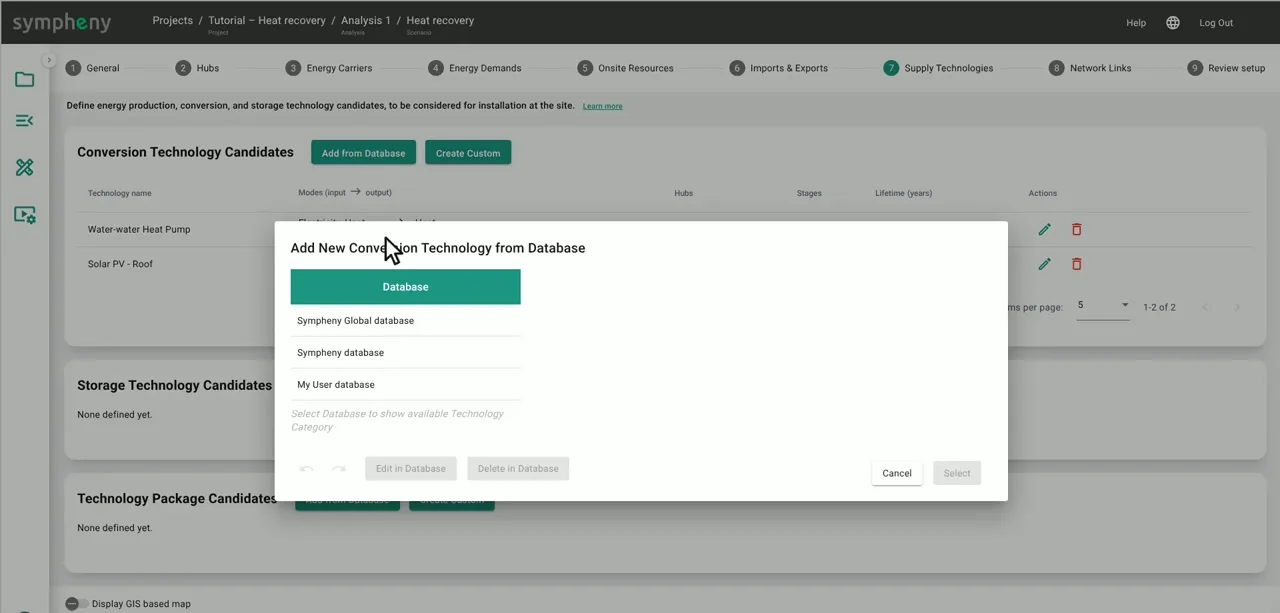
Then the electric chiller. One unit of electricity gives three units of cooling, plus four units of ambient heat as a second output to close the energy balance. That ambient heat is what the heat pump can pick up – or what gets dumped.
In the documentation: Supply technologies step ↗
- 12
Step 7, Supply Technologies: storage
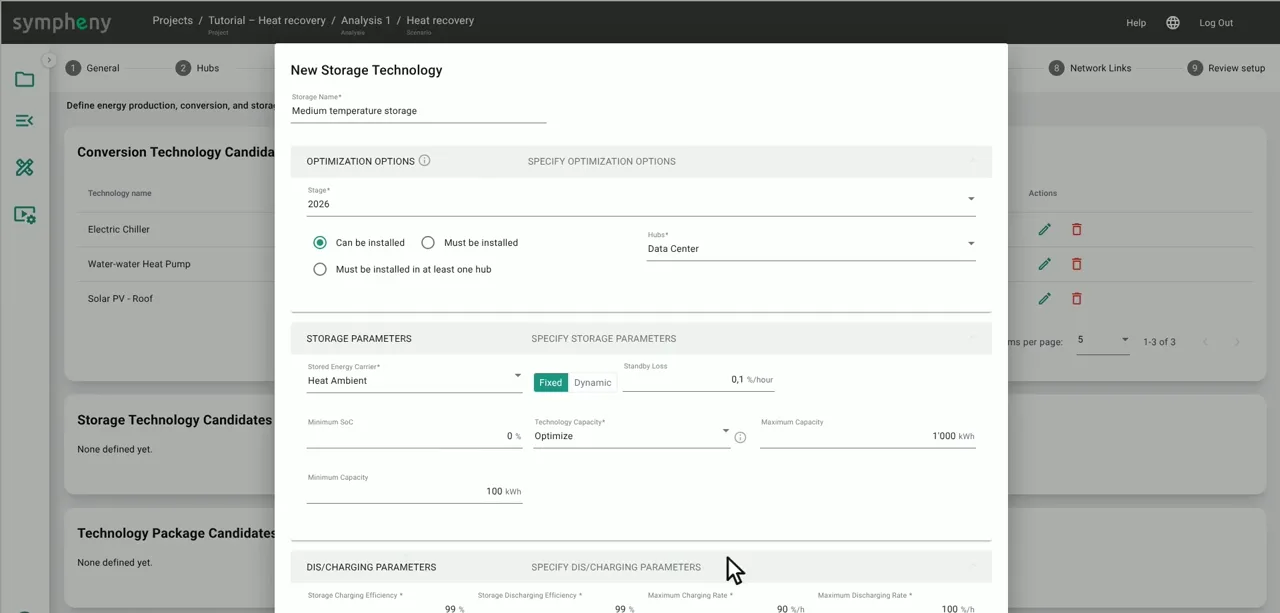
For storage, click Create Custom.
Add a medium-temperature heat storage for the ambient heat, capped at 1,000 kWh because these tanks take up space.
Add a battery, with a minimum (30 kWh) and a maximum (300 kWh) size.
In the documentation: Supply technologies step ↗ Storage technologies ↗
- 13
Steps 8 and 9, Network Links and Review setup
Step 8, Network Links: with one hub, you don't need a network here.
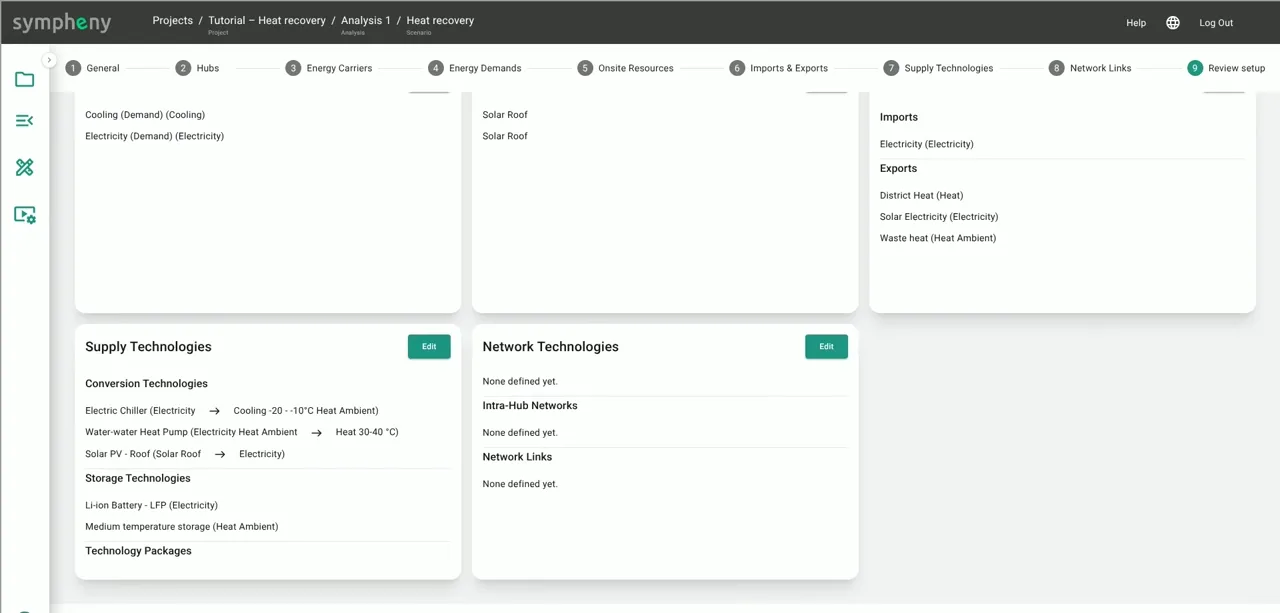
Step 9, Review setup, lists the whole system on one page: demands, resources, imports and exports, and every technology. Check it, then click Execution Options.
In the documentation: Network links step ↗
- 14
Run the optimisation
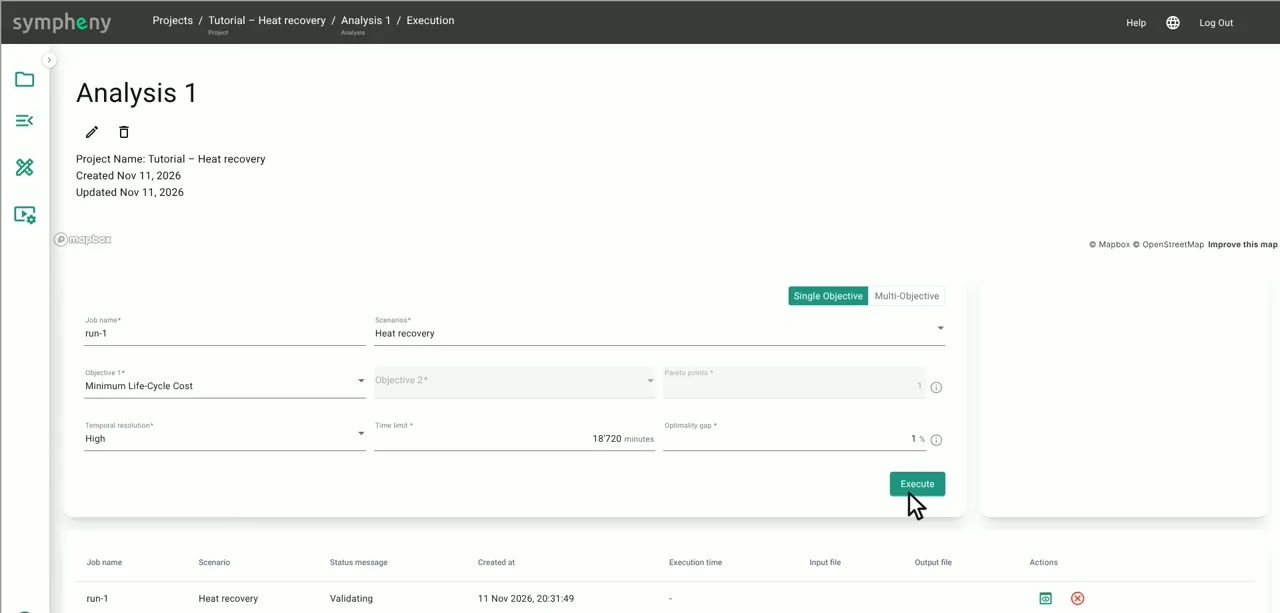
In the execution window, choose Single Objective, objective Minimum Life-Cycle Cost, and pick the scenario. Set the temporal resolution to High, then click Execute.
This one solved in under 30 seconds.
In the documentation: Execution ↗
- 15
Read the energy diagram
Click the chart icon next to the finished job to open the results.
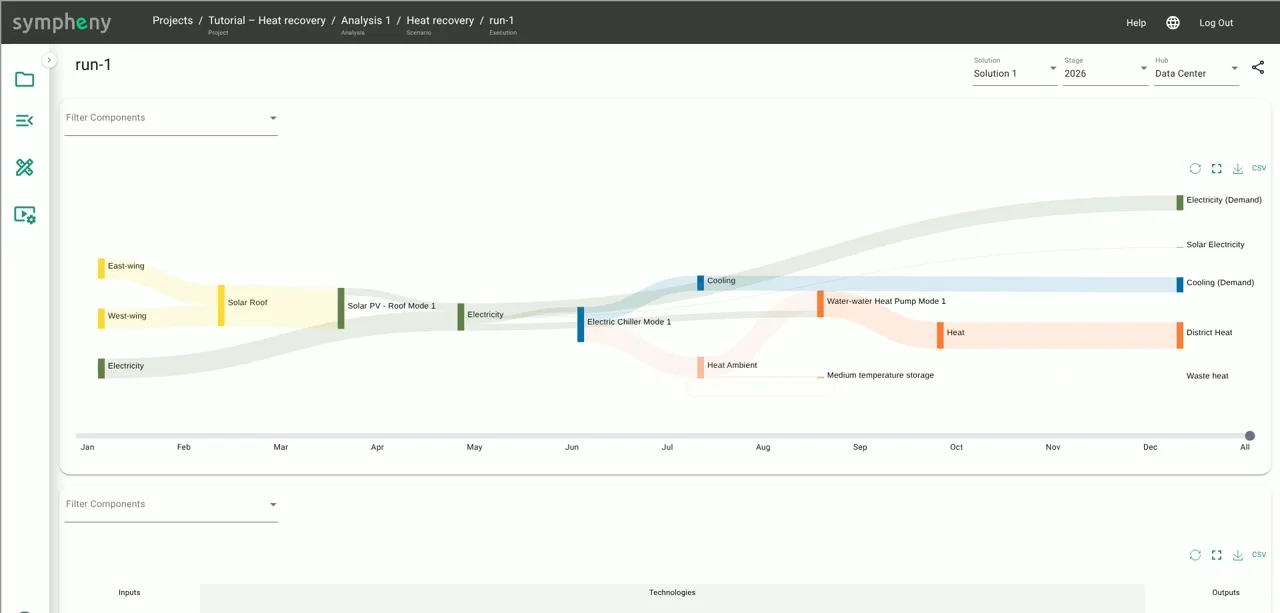
The energy diagram shows what Sympheny built and how energy flows through it. The heat pump recovers almost all of the chillers' waste heat and sells it to the district heating network: about 1,760 MWh a year. Only a few megawatt-hours are still dumped into the air.
In the documentation: Results dashboard ↗
- 16
Check the optimal sizes
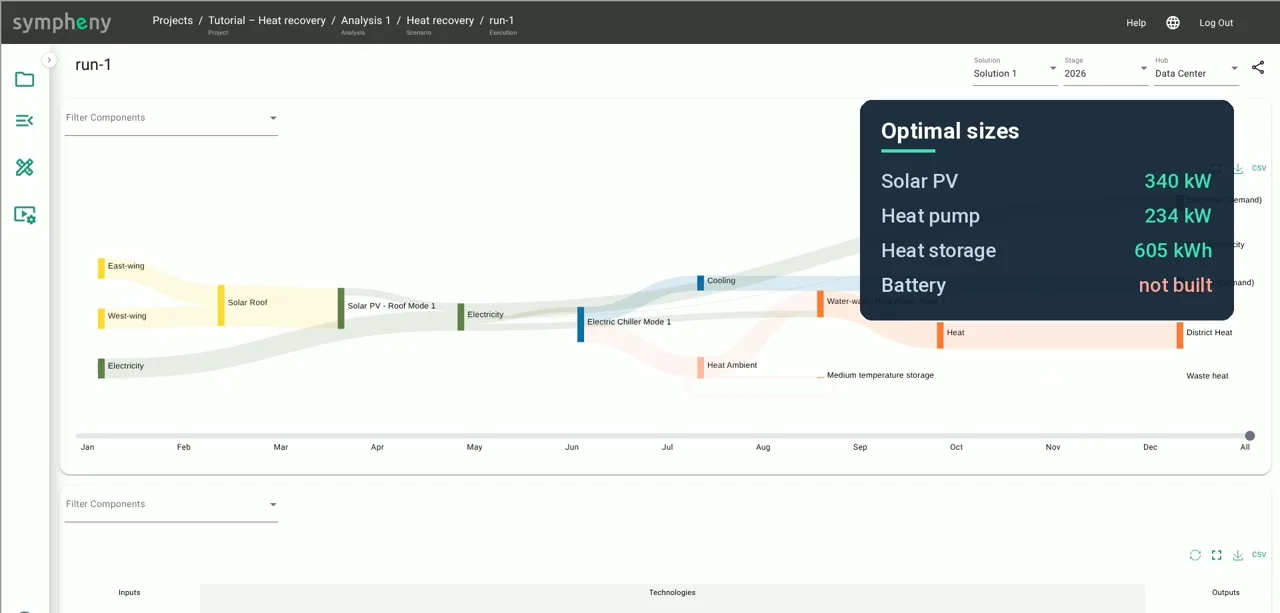
Solar: 340 kW, so almost the whole roof.
Heat pump: 234 kW.
Heat storage: about 600 kWh.
Battery: not built.
In the documentation: Results dashboard ↗
Results
With the prices in this example, the lowest-cost system over 20 years looks like this:
| Question | Answer | What Sympheny built |
|---|---|---|
| Sell the waste heat to the network? | Yes | 234 kW heat pump, about 600 kWh heat storage; about 1,760 MWh a year sold |
| Add solar panels? | Yes | 340 kW, almost the whole roof |
| Add a battery? | No | Not built |
- Selling the waste heat pays off: almost none of it is still dumped into the air.
- The answers depend on the prices you enter. Change the heat price or the grid tariff, run it again, and see what moves.
Try it yourself
Build the model alongside the video in your own Sympheny account, then change one assumption and run it again.
Stuck on a step? Ask our support team. Tell us which tutorial and step, and we'll help you get unstuck. Contact support ↗
Video transcript
A data centre in Geneva runs chillers on its roof. They dump heat into the air, and running them costs money.
Close by, the city's district heating network is about to expand.
So, from the operator's point of view: is it worth selling that waste heat to the network?
And should we add solar panels and a battery? Let's find out.
Let's build it. On the Projects page, click the plus button, name the project, and find the site on the map.
Then add a first scenario. Step 1, General. The currency is Swiss francs.
Under Stages, click Add New: one stage, 2026, 20 years long, with an interest rate of 2 percent.
Step 2, Hubs. Click Add New and add one hub: the data centre.
Step 3, Energy carriers. This system needs five. For each, pick the type and subtype, and give it a name: heat for the district heating network, ambient heat from the chillers, cooling, electricity, and the solar roof.
Step 4, Energy demands. Add the electricity demand: choose the carrier, give it a name, and upload an hourly profile.
For this example, we've prepared one with 8,760 hourly values.
In your own project, upload metered data, or generate a profile from Sympheny's database.
Add the cooling demand the same way. The chart icon shows the profile: cooling stays between about 70 and 200 kilowatts.
Step 5, On-site resources. The roof has 2,000 square metres for solar, in east–west pairs tilted at 15 degrees.
So add it as two resources of 1,000 square metres each. For each one, click Generate profile and pick Geneva, roof, 15 degrees, facing west.
Then the same again for the east wing. Step 6, Imports and exports.
Add grid electricity as an import: 20 cents per kilowatt-hour, a monthly capacity price, a fixed price, and its emissions.
Then three exports. Their prices count as income. Waste heat dumped through the air chillers costs money, so its prices are negative.
Surplus solar sells at 10 cents. And heat sells to the district heating network at 8 cents per kilowatt-hour, with a capacity price that stands for the piping.
Step 7, Supply technologies. Click Add from Database and pick solar panels for roofs.
We've adjusted the efficiency, lifetime and costs. The capacity stays open: Sympheny decides the size.
Next, the heat pump that recovers the waste heat: a water-to-water heat pump from the database.
Its inputs are electricity and ambient heat, one to three, so its COP is 4.
Tick Primary mode, and add it. Then the electric chiller. One unit of electricity gives three units of cooling, plus four units of ambient heat to close the energy balance.
For storage, click Create Custom. A medium-temperature heat storage for the ambient heat, capped at 1,000 kilowatt-hours, because these take up space.
And a battery, with a minimum and a maximum size. Step 8, Networks: we don't need one here.
Step 9 reviews the whole setup. Click Execution Options. Choose single objective, minimum life-cycle cost, pick the scenario, and click Execute.
This one solved in under 30 seconds. Click the chart icon to open the results.
The energy diagram shows what Sympheny built. The heat pump recovers almost all of the chillers' waste heat and sells it to the district heating network: about 1,760 megawatt-hours a year.
Only a few megawatt-hours are still dumped into the air. The sizes: solar, 340 kilowatts, so almost the whole roof.
Heat pump, 234 kilowatts. Heat storage, about 600 kilowatt-hours.
And no battery. So, the answers: yes, selling the waste heat pays off.
Yes to solar. And no to a battery. That's the heat recovery tutorial.
Change a value, run it again, and see what moves. If you have questions, we're happy to help.